

- Home
- About us
- Products
- Dealer Enquiry
- Blog
- Contact Us
- Home
- About us
- Products
- Dealer Enquiry
- Contact Us
- 044 -2486 1994
- +91 99623 98222
- sales@nantech.in
- REQUEST A QUOTE
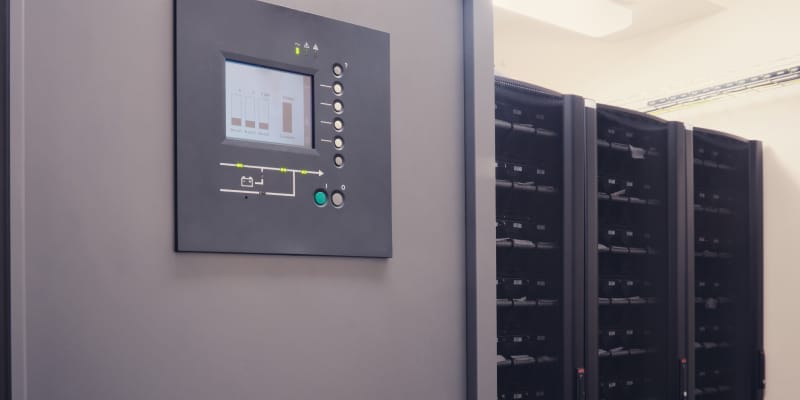
A Uninterruptible Power Supply (UPS) is a foundational investment for safeguarding business continuity and ensuring the continuous operation of your critical systems.
However, the reliability of a UPS and overall system uptime are entirely dependent on proper upkeep and consistent UPS maintenance — as simple maintenance errors can lead directly to:
With this in mind, looking for a UPS maintenance partner? Nantech — one of the leading UPS manufacturers in Chennai — helps businesses ensure optimal UPS performance.
This guide outlines the most common UPS maintenance mistakes and ways to avoid them. Let’s begin by understanding the key factors behind UPS failure.
The main cause of UPS failure is battery degradation — batteries have a finite life and lose capacity over time, leading to unexpected shutdowns during power outages.
Other major factors include:
So, how to troubleshoot UPS problems?
To troubleshoot:
Understanding why UPS failures occur is only the first step — let’s now look at the most common oversights and how they can be prevented.
Also Read: Key Things to Consider When Buying Active Harmonic Filters
Here are the four most common UPS maintenance mistakes — and the practical steps to avoid them before they impact system reliability:
Simply installing UPS and forgetting it, only checking when a problem is already apparent.
This “set and forget” approach allows undetected battery degradation to go completely unnoticed.
Your action plan should start with a simple, routine series of checks:
Using both routine inspections and detailed logs will allow your maintenance strategy to flow seamlessly — helping you identify performance trends over time and plan future upkeep proactively.
Failing to maintain the optimal temperature environment for your UPS.
Heat is the number one battery killer; for every 10°C above 25°C, battery life halves — a severe reduction in its serviceable lifespan.
Your action plan must be simple and direct:
Beyond environmental control, one of the most critical UPS maintenance mistakes is the mismanagement of electrical load.
When your UPS has printers, monitors, or even coffee makers plugged into it, you are connecting, for example, non-essentials that can push the system beyond its designed UPS load capacity.
This problem often stems from a common confusion about the outlets on the unit itself — misunderstanding their distinct purposes:
So, to prevent overloading the UPS:
Controlling these external factors is critical for UPS's longevity.
Delaying the replacement of UPS batteries and capacitors until they fail.
This error stems from a misunderstanding that these are consumable parts.
To avoid these failures, your proactive maintenance plan should include:
Note: It’s also a mistake to replace batteries one at a time, as the new ones can be damaged by sharing a system with old, failing batteries.
Overlooking firmware updates regularly released by UPS manufacturers.
To tackle this mistake:
Another dangerous practice is using extension cords or daisy-chaining power strips from the UPS output.
To handle this, follow a simple yet effective habit:
A critical organisational mistake is failing to act on the recommendations provided in technicians' service reports.
For your system's reliability to be effective:
Ultimately, this proactive blueprint helps correct the common procedural oversights.
Ongoing UPS maintenance is not a cost but a crucial investment in your operational resilience.
By avoiding the common UPS maintenance mistakes, you ensure:
Ready to ensure your power systems are resilient, compliant, and future-ready? At Nantech Power Systems Pvt. Ltd, Chennai, we help businesses avoid common UPS maintenance mistakes and maintain reliable backup power.
Connect with us today for a professional power system assessment!
The UPS Rental Checklist
Uncovering the Game-Changing Benefits of Modular UPS Systems
Modular UPS Versus Conventional UPS: Differences Decoded
The Beginner’s Guide to UPS Systems
Why is UPS Maintenance Important?
POWER QUALITY AUDIT OF NANTECH PRODUCTS
Understanding The True Solar Panel Lifespan For Your Home Asset
Do Solar Panels Work in the Rainy Season? Exploring the Facts
Navigating Common UPS Maintenance Mistakes and How to Avoid Them
Key Things to Consider When Buying Active Harmonic Filters
Why Does an AC Need a Stabiliser? An Insightful Guide
We had availed the services of “NANTECH POWER SYSTEMS PVT LTD” and their service was excellent. Their rates were competitive when compared to others. They have discharged their services in professional manner. We appreciate the timely delivery (at a time, convenient to us) of the battery for the UPS at a very competitive rate.

We purchased UPS from Nantech for most of our systems and they are all working as expected. Their after sales service is exceptional and was the primary reason why we did not have any inhibitions in taking an AMC with them. Keep up the good work!


Nantech Power Systems Pvt Ltd,
17a, 2nd Cross Street,
Sastha Nagar, Valasaravakkam,
Chennai ‑ 600087.
